

Introduction Of Google Analytics
Google Analytics is a Tool for Web Analytics. Friends, When We Talk About “Analytics”, Then “Analytics” is a Very Broad Term. It is Not That the Word Analytics is Used Only From the Point of View of Digital Marketing. Whenever You Have to Do Some Analysis Around the Data, We Call It “Analytics”. But When We Talk About Digital Marketing, We Know That Our Website is Important for Us There, That is, Our Web Presence is Important.
Google Web Analytics
So, Whenever You Want to Study the User Behavior Around the Website, What Kind of Behavior Are the Users Who Are Coming to Our Website, Which Pages Are They Visiting, Which Cities Are They Coming From, and What Are Their Demographics, Which Pages Are They Visiting and for How Long Are They Staying, and From Which Devices Are They Coming, When You Want to Study or Analyze Many Such Insights, Then This Field is Basically Called Web Analytics.
There Are Many Tools Available in the Market for Web Analytics, but Google Analytics is a Free Tool and the Biggest Thing is That It is a Tool of Google, So Most of the People Use Google Analytics Only, Whose Updated Version Has Come in the Form of Google Analytics 4.

Create Account On Google Analytics
If You Want to Use Google Analytics, You First Need to Create an Account With Google Analytics. Creating an Account With Google Analytics is Very Easy and Free of Cost.
When You Create an Account With Google Analytics, You Receive a Code. You Must Embed This Code on Your Website, Which Connects Your Website and Google Analytics. After This, the Data About Your Website’s Users or Visitors Appears as Follows:
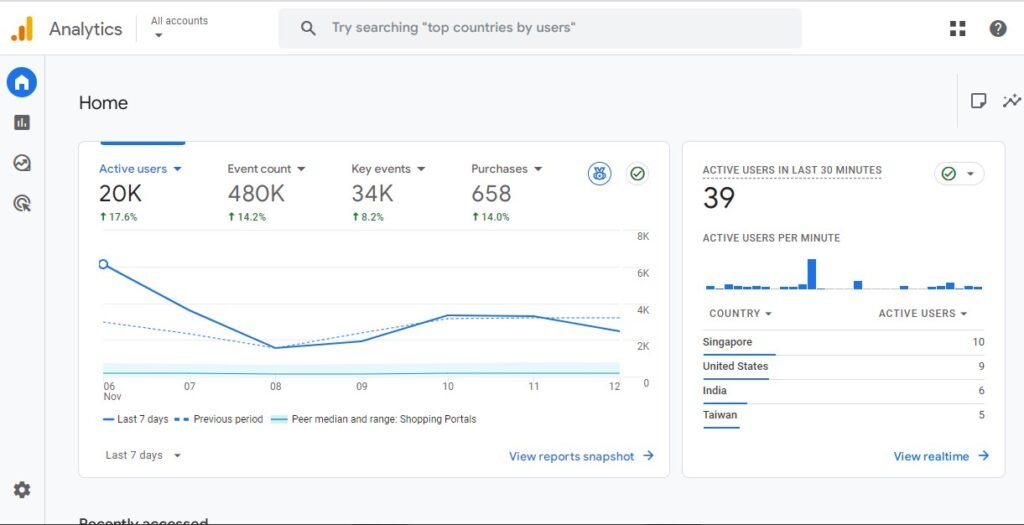
You Can Now See in the Image Above That We Are Seeing a Complete Analysis of the Website. You Can See the Total Number of Visitors to the Website in a Particular Time Period, the Number of Events Counted, the Number of Conversions, the Number of New Users, the Number of Users Who Came in the Last 30 Minutes, and the Locations From Which They Came. You Can Find All This Information Here: How Many Sessions Are Being Generated, From Which Sources, From Which Countries Are People Coming, and What Types of Pages Are They Visiting.
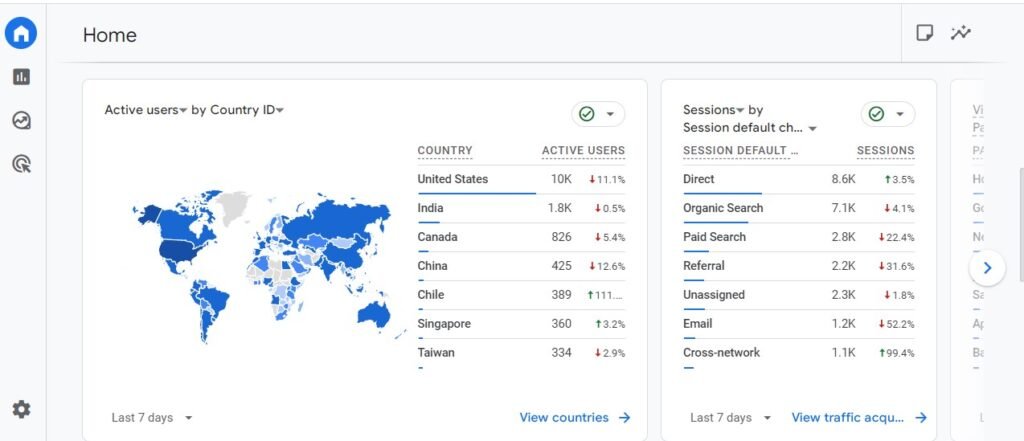
Therefore, We Recommend That Google Analytics (GA4) Be Integrated Into Your Website as Soon as Your Website is Built, So That You Can Start Receiving Website Information From Day One.
Benefits Of Google Analytics
1. Understand Website Traffic According to Different Sources/Devices
When You Submit Your Website to Google Analytics, You Can Learn About the Users Coming to Your Website and the Medium Through Which They Are Coming, I.e., Whether They Are Coming From Organic Search, Social Media, Direct, or Google Ads. This Helps You Understand Which Channel is Driving the Most Traffic.
Google Analytics Tells You Which Device Visitors Are Using to Access Your Website, I.e., Whether Users Are Coming From Mobile, Desktop, or Tablet. This Helps You Understand Which Device Your Website is Running Best on and Where Improvements Are Needed. If You Find Out That Most of Your Website Traffic Comes From Mobile, Instagram, or a Specific Country/city, You Can Focus Your Ads and Marketing Accordingly.
2. Understand User Demographics
In Google Analytics, We Can Find Out the Age, Gender, Interests, Etc. Of the People Visiting Our Website. That is, Through This Option, You Can Find Out What Age Group of People Are Visiting Your Website, How Many Are Men and How Many Are Women, and What Kind of Topics Are the Visitors Interested in (Like Technology, Travel, Fashion, Gaming, Etc.). This Helps You Understand Your Audience Better. When You Know What Kind of People Are Visiting Your Site, Then You Can Make Better Content, Better Marketing and Better Business Decisions.
3. Improve User Experience
Google Analytics Provides Us With Information About the Most Popular Pages on Your Website, the Pages From Which Users Are Bouncing, and the Locations Where They End Up. This Shows the Areas of Your Website That Are Working Well and Those That Want Improvement. Google Analytics Displays the Speed at Which Your Website Loads as Well as the Devices or Pages That Load More Slowly. You Can Increase the Speed of Your Website Using This Data.
Google Analytics’ User Flow Report Allows You to See Where Visitors Enter Your Website, What Pages They View, and Where They Depart. Google Analytics Also Shows How Mobile Users Behave on Your Website. If Your Website’s Mobile Bounce Rate is High, You Can Improve Its Layout, Fonts, Speed, and Other Features. By Using Analytics to Identify the Kind of Content That Users Prefer and the Most Popular Pages, Videos, Or Blogs, You Can Improve and Enhance the Content That Users Enjoy.
Google Analytics Provides Data That Aids in Our Understanding of User Behavior. We May Enhance the Overall User Experience by Using That Data to Improve the Design, Content, Speed, Navigation, and Mobile Experience of Our Website.
4. Optimize Marketing Campaigns of All Types
When You Run Marketing Advertising Campaigns, Such as Google Ads, Facebook Ads, Instagram Promotions, Email Marketing Etc., Google Analytics Tells You How Many People Visited Your Website Through Your Campaigns, Which Sources—facebook, Google, Instagram, Email, Etc.—are the Most Frequent Visitors. Which Campaign is Driving the Most Conversions, and Which Audience is Most Interested in Your Product/service. Looking at This Data Helps You Better Optimize Your Campaigns.
So Using Google Analytics, You Can Further Optimize and Align Your Marketing Campaigns Because You Know What Users Are Doing on Your Website. You Can Further Improve Your Marketing Campaigns and Marketing Efforts Accordingly.
5. Understanding and Creating Audiences
We Can Quickly Construct and Comprehend Audiences With Google Analytics. for Both On-Page SEO and Digital Marketing, This is Essential. It Provides You With Information About the Kind of Visitors to Your Website, Their Actions, the Pages They View, and the Conversions They Make. a User Group Formed Based on Particular Behavior, Interests, or Actions is Called an Audience.