

Introduction
As we have explained in our other blogs, whenever we talk about SEO (Search Engine Optimization), or about ranking our website or webpage in Google’s search engine, there are many Google guidelines that we have to follow. We have divided these guidelines into three major categories or processes: the first is On-Page SEO, the second is Technical SEO, and the third is Off-Page SEO. All the steps we take under SEO, or all the work we do in SEO, are divided into these three categories. In this particular blog, we will discuss what On-Page SEO is, what it means, and what activities we perform under On-Page SEO.
As we mentioned in our SEO introduction blog, SEO is evolving very rapidly today and will continue to evolve in the future. So, first, we will discuss the fundamentals or basics of On-Page SEO. By basics, we mean the things that have been around for a long time and that we absolutely must do. We will also discuss what things we need to keep in mind regarding On-Page SEO in 2026, or how the algorithm is behaving regarding On-Page SEO.
SEO is Always Done Page Wise
Whenever we talk about SEO, always remember that SEO is always done page by page, meaning you optimize individual pages. For example, let’s say you have a website, and a website is a collection of different web pages. The website has pages like home, about us, services, etc. When we talk about ranking our website’s home page, we are talking about a particular page of our website, which is the home page. So, all your SEO will always be page-specific. Therefore, when you do SEO, you will pick specific pages and research keywords for that particular page, determining which keywords you want to rank that page for. You will then write your content around those keywords and perform on-page and off-page SEO for that page.
Definition of On-Page SEO
On-page SEO is a process that involves optimizing the visible content and HTML source code present on a website.
Each webpage on our website has some visible content that is visible to us and our users. We need to optimize this content and its various elements. Similarly, each webpage also has its source code, which also requires some optimization. For example, if we need to implement schema code on a webpage, the schema code is not visible on the webpage. it’s not a visible element. We implement it in the code. That’s why we’ve included in the definition that we optimize both the visible content and, sometimes, the HTML source code.
Knowledge Of HTML Code For On Page SEO
Now here another question arises that is it necessary for us to know coding to do SEO because sometimes we have to do some optimization in the source of the website also, so this query comes in the mind of many people that if we want to learn search engine optimization then is it necessary for them to know coding, so see friends, if you have knowledge of basic HTML then it is very good and if you do not have it then we advise you to acquire knowledge of basic HTML. It’s not much; even 8 to 10 days of good practice will be more than sufficient from an SEO perspective, and it will always provide some advantage.
The amount of coding knowledge you need for SEO also depends on the technology used for the website you’re SEOing. If your website is built on a CMS (Content Management System) tool like WordPress, Shopify, or Wix, then you don’t need to have coding knowledge. However, if your website is custom-coded, then basic HTML knowledge is essential. We’re not saying that coding knowledge is completely mandatory at the beginning. If you’re just starting out with SEO, first strengthen your SEO foundation, understand the basics, and then move on to HTML knowledge.
So, broadly speaking, On-Page SEO means optimizing the content on your website according to Google guidelines, as well as making some optimizations to the HTML source code.
On Page SEO vs Technical SEO
Many people ask whether On-Page SEO and Technical SEO are the same. While some things may seem similar, there are differences between the two. On-Page SEO focuses primarily on a specific webpage, while Technical SEO focuses on the entire website. For example, when we talk about website speed optimization, we optimize the speed of the entire website. When we talk about an SSL certificate, it’s not just a specific page on the website; it’s applied to the entire website. Under Technical SEO, all tasks or activities are applicable to the entire website, while Under On-Page SEO, tasks and activities are applicable to each specific webpage.
On-Page SEO Factors
Now we’ll discuss some standard points regarding On-Page SEO that we must keep in mind. After this, we’ll discuss some factors that you should pay attention to, especially for 2026.
Structure of Content
Structure of content means that you should check whether the keywords you want your website to rank for have separate pages. If it turns out you’re putting a lot of effort into a keyword, but there’s no dedicated page for it, we should pay attention to this.
Meta Titles
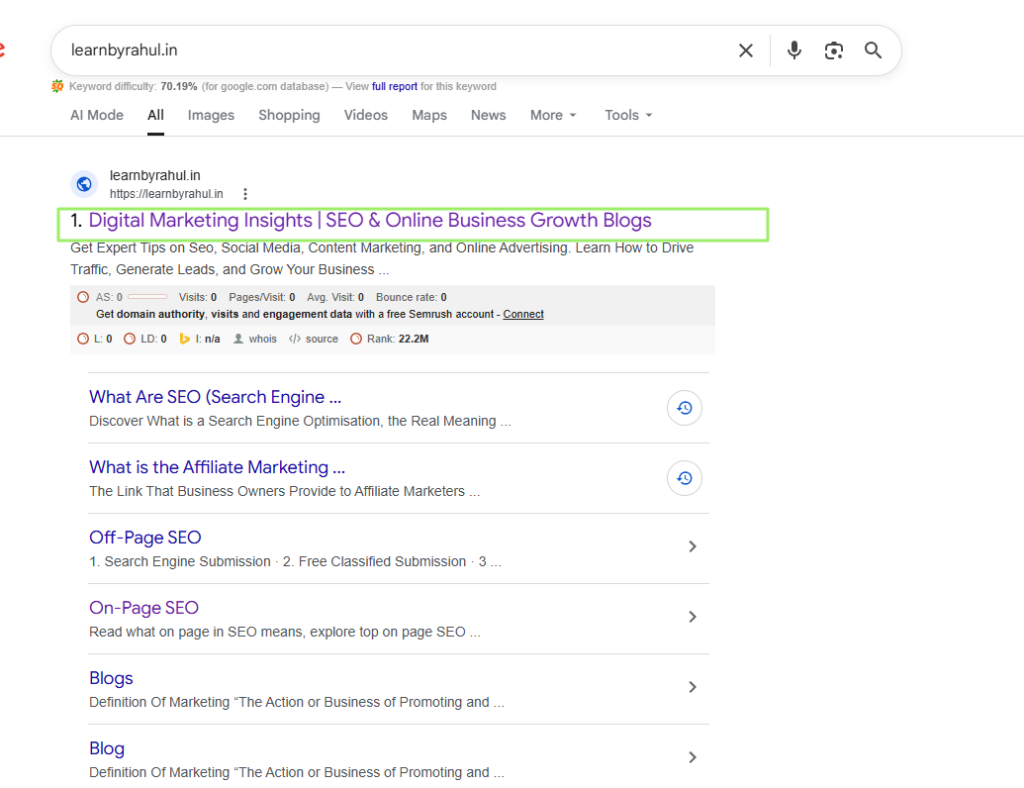
When you search for a keyword in a search engine, you’ll see a list of websites. The dark blue text that appears after the website’s URL is called the meta title. The meta title should strategically use the keywords you want to rank your website or webpage for in search engines. We shouldn’t engage in keyword stuffing, but rather use them in an optimized manner. We also need to consider the length of the title. According to Google’s guidelines, the length of the meta title should not exceed 570 pixels.
Meta Description
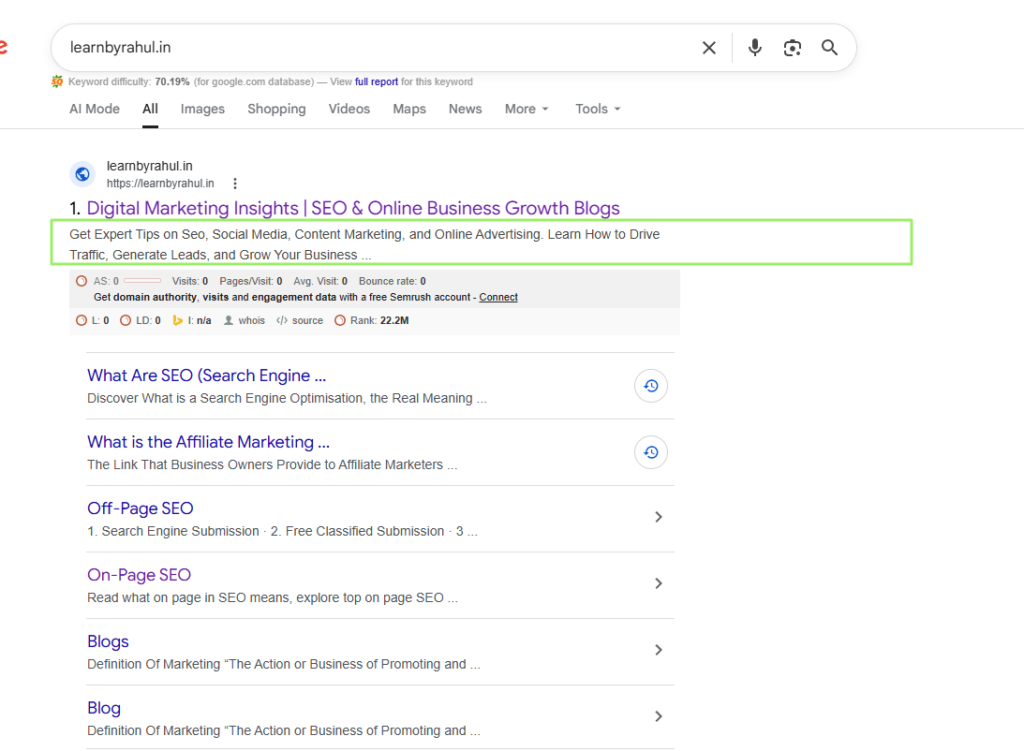
As mentioned above, when you search for any query in a search engine, a list of websites appears. At the top, you see the website’s URL, followed by the meta title. Just below the meta title, you see the light and black text. The meta description is shorter than the meta title. Just like the meta title, we should optimize our keywords in the description as well. By optimized, we mean using our keywords in a natural way. It should not appear as if we are spamming keywords. According to Google guidelines, the length of the meta description should not exceed 920 pixels.
Header Tags
Whenever we write content or a blog, it has a main heading and several subheadings, and the content is written within these. These are called header tags. These usually range from H1 to H6. For SEO, we must use header tags properly so that we can give the content of our website or webpage the correct structure. Structure means that we should write the heading first, then a few paragraphs. We shouldn’t write all the content in paragraphs. Google doesn’t like this. Always remember that any webpage or blog page should have only one H1. Furthermore, we can have multiple heading tags.
Image Optimization
Image optimization, within SEO, means that the images we use on our websites or webpages should be properly optimized. We should use them as small as possible. This makes them load faster when our webpage is opened in a search engine. If the size of our images is large, our webpage will load slowly. If the size of our images is small, our webpage will load faster. We should also add unique alt text to each image. Alt text is some information about the image that tells what a particular image is about.
Internal Linking
When we link pages on a website to other web pages on the same website, this activity is called internal linking. This allows both users and search engines to easily navigate our website.
For example, if you have a blog post on your website explaining “what is SEO” and another post explaining “what is on-page SEO,” and if you link to “what is on-page SEO” in the “what is SEO” post, this would be called internal linking. When internally linking, we should keep in mind that we should only link to posts or pages that are already on our website. Your anchor text should be relevant to that post or page. Anchor text is the specific text that hyperlinks to the URL of another post or page. Therefore, we also need to optimize internal linking under on-page SEO.
Depth of Content
Depth of Content means that when you write content on a topic on a page or post, you should not just write superficially about that topic, but should write in detail about it, covering all the points so that you can reach the depth of the content. If you don’t want to go too deep into your content, at least ensure that you write content that is better than your competitors.
Schema Markup
Google, along with all other search engines, invented a code called schema markup. This is a type of special code added to a website’s HTML. This code helps search engines understand what a particular webpage is about and the type of content on the page.
When you use schema markup, search engines can better understand your content and sometimes even display rich snippets in search results (such as star rating, price, event date, etc.).
Types of schema:
1. Organization Schema
2. Article Schema
3. Product Schema
4. Review Schema
5. Recipe Schema
6. FAQ Schema
7. Breadcrumb Schema
8. Video Schema
9. How-To Schema
10. Person Schema
Optimized URL
Just as our homes have an address, similarly, the URL (uniform resource locator) is the address of our webpage, also known as a web address. Basically, our webpage’s URL consists of two parts: The first part is our domain name. The second part is our slug, which is also called the permalink. So, we can optimize our URL’s slug, or permalink, for SEO.
When optimizing a URL, we should keep a few things in mind: add our keywords to the URL; always try to create short and simple URLs; we should not make the URL too long; always use hyphens (-) in the URL instead of underscores (_) because Google interprets an underscore as just a space; we should avoid special characters in the URL, such as %, &, $, ?, etc., and use lowercase letters in the URL.
Other Important Factors For 2026
User Experience
User experience refers to how a user interacts with the page when they type in a keyword and arrive at your website or webpage. Google doesn’t consider this a good practice.
When someone person visits your website or webpage and then leaves within a few seconds, it means your website wasn’t relevant to their query or they didn’t like the content. This impairs the user experience, and Google doesn’t consider this a good practice. Because Google is now also focusing on the user experience each user receives when visiting a website or webpage.
CTR Optimization
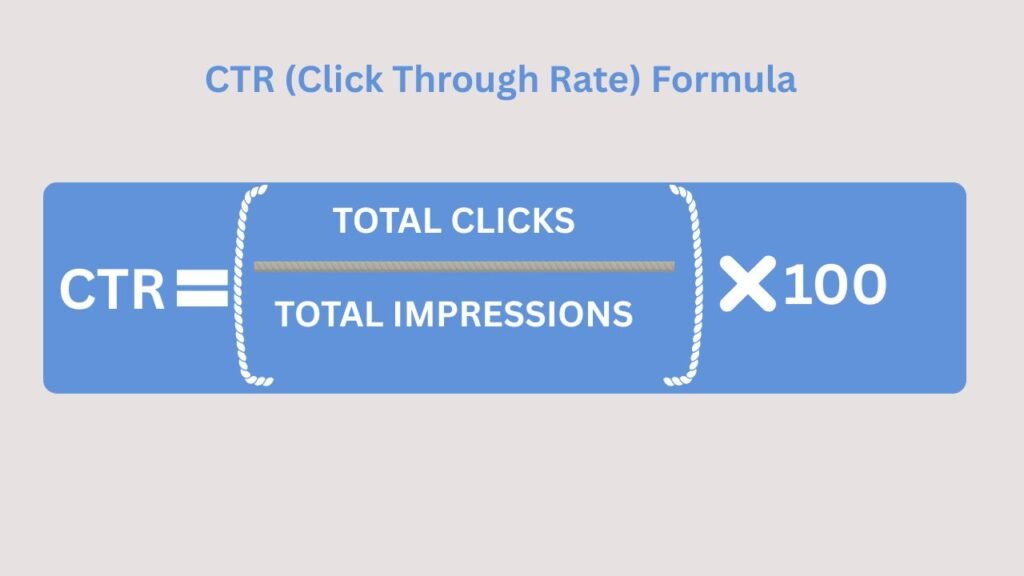
CTR stands for click-through rate. It refers to the percentage of people who view your particular website, webpage, or advertisement out of them how much persantage of people who click on it. This indicates the relevance and effectiveness of your content.
To improve CTR (click-through rate) in SEO, we should use our keywords effectively and strategically create title tags, and write persuasive meta descriptions with clear calls to action. We should also use schema markup for rich snippets like FAQs. And we should also ensure that your webpage URLs are short and relevant.
Optimizing Content Based On Search Intent
Here, we’re talking about the intent of your content, meaning the content on your website or webpage should fulfill the user’s intent. Google monitors whether a user is finding the information they’re looking for on your website. For example, if a user types in the keyword “fitness tips,” the content on your webpage is relevant to the user’s query. Google therefore considers that your content should fulfill the user’s intent.
Page loading speed
Your website or webpage should open or load quickly in search engines. Slow loading speeds can degrade the user’s experience, and users may not want to visit your website again. If the images, JS and CSS files on our website are not optimized, the loading speed of the website slows down. Therefore, we should optimize the size of the images on our website and minify the JS and CSS files so that the loading speed of the webpage can increase.
Content Depth
Content depth refers to whether the content on your website or webpage explains a topic in depth. Through this topic, Google is saying that when you write content about any particular topic, it should be explained in depth and detail. Your content should be informative, covering topics from basic to advanced levels, and also covering subtopics related to the main topic.
Good content depth helps you rank in Google and improves user experience. Good content reduces customer bounce rates and builds your website’s authority.
Engagement Rate
Engagement Rate measures how much visitors to your website are interacting with your content. Engagement Rate tells us how long users are staying on the page, whether they are scrolling through the content, and whether they are clicking on our internal links. If users actively interact, the engagement rate is high. If users leave the website immediately after arriving, the engagement rate is low.
A high engagement rate signals to Google that the content on the website is very useful, improving its ranking, improving the user experience, and increasing the chances of conversion.
EAT framework (Expertise, Authoritativeness, and Trustworthiness)
This concept is part of Google’s Search Quality Guidelines. Google uses it to assess the reliability and quality of the content on the website.
Expertise:
The content writer you hire for your website should be an expert in your industry, meaning they should have complete knowledge of your niche. For example, if a webpage on your website contains an article on a health topic, such content written by a doctor or medical expert will be considered more valuable.
Authoritativeness:
Your content should be authoritative. This depends on the author’s or website’s reputation in the industry, how many other trusted websites mention it, and how many quality backlinks you have. All of these factors strengthen the website’s and content’s authority.
Trustworthiness:
This measures how reliable and secure your content and website are. For this, your content should contain accurate and up-to-date information. If you’ve sourced content from elsewhere, you should mention the sources. The website should also have clear contact details.
So by now you must have understood that Google’s algorithms are becoming increasingly user-centric. If the algorithms indicate that your content is not user-friendly or not in accordance with the user’s intent, you will definitely face challenges in ranking your content. Because Google’s primary goal is to fulfill the user’s intent.