

Table of Contents
ToggleIntroduction to Technical SEO
Friends, whenever we discuss SEO, most of the conversation or the activities we talk about revolves around either on-page or off-page SEO. Very few people discuss the optimization and proper implementation of technical SEO.
When discussing website rankings, on-page SEO is certainly important; in fact, it is possible for a website to rank based solely on on-page SEO even without off-page efforts like building backlinks. However, no website can rank without technical SEO; that is the extent of its importance.
As we know, on-page SEO involves working on our content optimizing the material on our website for search engines so they can understand what the content is about while off-page SEO focuses on backlinks. So, what exactly do we do in technical SEO, why do we do it, and how important is it? We will discuss all these aspects in this blog and also explore the specific processes and activities involved in technical SEO.
Definition Of Technical SEO
Technical SEO is the process of optimizing a website’s infrastructure and behind-the-scenes code so that search engines and AI systems can easily find, crawl, render, index, and cite its content.
The Importance of Technical SEO
When it comes to SEO, technical SEO is extremely important. If you want to rank a website, you must first ensure it is properly crawled and indexed. For search engine crawlers to effectively crawl all the web pages on your site—and to read, understand, and accurately categorize (index) their content—it is essential to optimize the technical aspects of your website. This is why technical SEO is considered so crucial.
Technical SEO is Include Crawling, Indexing, Rendering, And Website Architecture
When we begin to implement technical SEO effectively, it means we are improving our website’s crawlability. Everything starts with crawling; for instance, if Google’s crawler visits a website or webpage but cannot crawl or scan it properly, Google will be unable to rank that website or webpage.

Let’s Consider Another Example
Suppose we are providing this blog for you to read, but you cannot understand what is written in it; consequently, you wouldn’t be able to implement anything based on it. The same principle applies here: if we fail to make our website or webpage “crawl-friendly” or if Google’s (or any search engine’s) crawlers struggle to understand the site then no further progress can be made.
Primary Objective of Technical SEO (H3)
The primary objective of technical SEO is to ensure that our website can be crawled effectively, indexed correctly, and rendered properly. Furthermore, the website’s architecture (page structure, navigation) must be crawler-friendly to facilitate smooth crawling, indexing, and rendering processes.
Therefore, all the activities we undertake or those that are recommended to ensure these processes run smoothly fall under the umbrella of technical SEO.
Note:- Without Technical SEO You Cannot Rank Your Website!
The Core Elements of Technical SEO
1. Site Structure – It Should Be Organized
For instance, imagine we have a website named “learnbyrahul.in” representing our agency, and within its menu, we have created three main categories: “About,” “Services,” and “Training.” If we offer SEO services under the “Services” category, we would have a dedicated page for it; similarly, we would have separate pages for PPC services and content marketing services.

Likewise, suppose we offer SEO training under the “Training” category; that would constitute one webpage. Similarly, if we provide training for SMO and Facebook Ads, each would have its own webpage, and all three would fall under the “Training” category. You have likely seen this type of structure on many websites.
However, if we were to create a sub-category named “PPC” *inside* the “SEO” sub-category (which itself is under the “Services” category), the structure would be incorrect. We must ensure that all our webpages are placed in the appropriate categories. This essentially relates to site structure—meaning a search engine crawler should not face any difficulty in understanding your website.
Maintain a Consistent and Logical Site Structure (URL Structure)
For example, suppose our website is “learnbyrahul.in.” If I offer SEO and PPC services, the URLs should look like this: “learnbyrahul.in/services/seo” and “learnbyrahul.in/services/ppc.” However, if I were to create a URL like “learnbyrahul.in/training/seo/services,” that would not be a good URL structure.

Therefore, we must ensure that our website’s URL structure is consistent and uniform; in other words, pages related to services should fall under the “services” category, while pages related to training should be placed in the “training” section.
Crawling-Related Issues in Google Search Console
When you create a website, Google might encounter issues while crawling its web pages. When you connect your website to Google Search Console, you gain access to various tools—one of which is the “URL Inspection” tool. By using this tool, you can determine whether your website’s individual web pages are being properly crawled and indexed.
If Google encounters any problems while crawling or indexing your web pages, those issues are displayed there, and you also receive suggestions on how to resolve them.
Sitemap.xml
XML sitemaps inform Google’s crawlers about a website’s structure—specifically, the location of its various web pages. Essentially, the XML sitemap facilitates the crawling process, enabling the crawler to scan the website effectively.

As previously mentioned regarding technical SEO, we aim to get our web pages crawled; the Sitemap.xml plays a crucial role in enhancing the website’s crawlability.
Robots.txt
Robots.txt is a text file used to provide instructions to crawlers from Google and other search engines regarding which web pages should be crawled and which should be excluded. Consequently, Robots.txt is also an integral part of technical SEO.
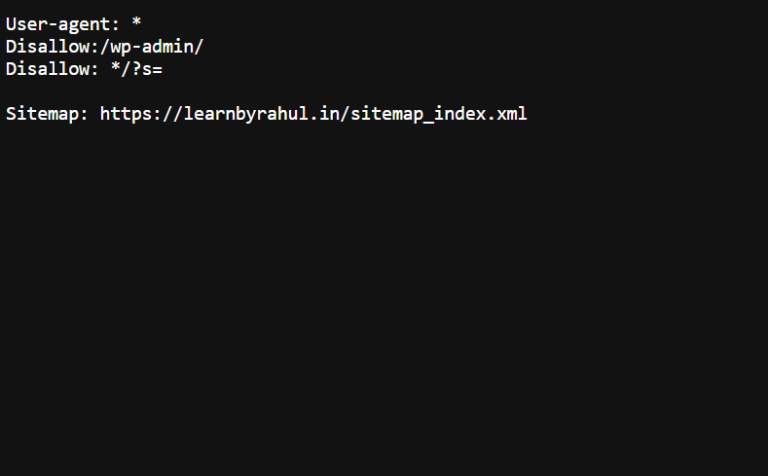
However, it is important to note that the focus here is not merely on creating the Robots.txt file; optimization is far more critical. We should not simply create the file and leave it as is; we must ensure that the content—specifically the ‘allow’ and ‘disallow’ syntax—within the Robots.txt file is properly optimized.
Mobile-Friendly
Mobile-friendly means your website must be optimized for mobile devices; in other words, the layout should remain intact when a user opens the site on a mobile phone. Due to smaller mobile screens, content or large images often fail to display correctly, and loading speeds can suffer. Therefore, we must ensure our website is optimized for mobile use so that users do not encounter these issues when accessing the site on a mobile device instead of a desktop.

This is achieved by ensuring the website’s structure is mobile-compatible and by compressing large images as well as JS and CSS files to reduce their size. Compressing these elements allows them to load properly on mobile devices, thereby increasing the website’s mobile loading speed.
Index Tags
In on-page SEO, index tags function as HTML instructions that tell Google and other search engines whether or not to index a specific webpage. Simply put, index tags help search engines understand which website pages should be stored and displayed in search results.
You might be wondering about the difference between index tags and the robots.txt file. Index tags allow you to prevent a specific webpage from being indexed, whereas the robots.txt file allows you to prevent a page from being crawled in the first place (and if a page isn’t crawled, it won’t be indexed). Furthermore, while index tags target a specific webpage to prevent indexing, the robots.txt file can block the crawling of a specific webpage as well as any associated webpages.
Index tags provide instructions to search engines regarding page indexing, whereas robots.txt tells crawlers which website URLs they are permitted to crawl.
Canonical URL Implementation
Suppose you have a website with numerous web pages, and some of these pages share nearly identical content and URLs; in such cases, Google and other search engines may struggle to determine the primary URL for a specific page. We use canonical URLs to resolve this issue.
A canonical URL informs search engines which specific URL is the primary one among several URLs containing similar content. Therefore, canonical URLs are a crucial component of Technical SEO and play a vital role in the indexing of web pages.
Optimize 404 Pages
Suppose your website had a webpage named “Page X,” and a link to it was mentioned on another website. If you subsequently deleted Page X for some reason, the link on the other external site would remain. Users and Google’s crawlers would still encounter and click on that link. However, when they attempt to visit Page X, they will be unable to reach it because it has been deleted; consequently, the page will return a 404 error.

Google does not look favorably upon situations where a search engine crawler follows a link to your site only to encounter a 404 error. Google considers this a detriment to both the user experience and crawler resources. Therefore, you should redirect these 404 pages to another relevant or similar page. From a technical SEO perspective, your website’s also 404 pages create errors.
SSL Certificate
SSL stands for Secure Sockets Layer, and an SSL certificate relates to your website’s security. When a website’s URL begins with “https,” it indicates that the site has an SSL certificate installed. SSL certificates have become increasingly important in recent times; while they weren’t considered critical in the past, updates over time have made them essential—meaning your site really ought to have “https.”
Website Speed
When discussing website speed, there are two key factors that can hinder performance: the images and content on your site, and your hosting provider. Essentially, if your images and content are “heavy” (large in size) but your hosting plan (server) isn’t robust enough to handle them, speed issues arise. Addressing these two areas will allow you to resolve website speed problems. There are also many tools available—such as Google’s PageSpeed Insights—that provide valuable data regarding your website’s speed.